Archive for the ‘Technology’ Category

Search using Geolocation data in MySQL

Wednesday, August 31st, 2011

One of the many things brought to the forefront by HTML5 is Geolocation. It’s easy enough to get someones geolocation data using HTML5 but what do you do with it once you have it? Ideally you’d like to search through some sort of database be it store locations, real estate listings or what have your. This is where most people start to get tripped up.

There’s lots of different techniques for achieving this unfortunately they don’t seem to ever be explained very well as they relate to MySQL. Until now… dun dun dun dahhh.

The two most common technique are the Haversine formula and the Spherical Law of Cosines. The method I’ve chosen to use in my example is the Spherical Law of Cosines. The formula is a bit short and uses fewer mathematical functions.

The example is comprised of two parts. The first is the Spherical Law of Cosines. The second part is defining a search radius. Defining this search radius will significantly narrow the scope of our search. This is a good thing.

Alright enough chitchat. Here’s the sample MySQL query. It’s built in PHP below but can easily be converted to your language of preference.

Note: I’m Canadian so the example below is done using kilometers. If you want miles you’ll need to multiple $earths_radius and $surface_distance_coeffient by 0.6214 to convert them to miles.

// Search parameters
$lat = 45.411572;
$lng = -75.698194;
$radius = 25;
 
// Constants related to the surface of the Earth
$earths_radius = 6371;
$surface_distance_coeffient = 111.320;
 
// Spherical Law of Cosines
$distance_formula = "$earths_radius * ACOS( SIN(RADIANS(latitude)) * SIN(RADIANS($lat)) + COS(RADIANS(longitude - $lng)) * COS(RADIANS(latitude)) * COS(RADIANS($lat)) )";
 
// Create a bounding box to reduce the scope of our search
$lng_b1 = $lng - $radius / abs(cos(deg2rad($lat)) * $surface_distance_coeffient);
$lng_b2 = $lng + $radius / abs(cos(deg2rad($lat)) * $surface_distance_coeffient);
$lat_b1 = $lat - $radius / $surface_distance_coeffient;
$lat_b2 = $lat + $radius / $surface_distance_coeffient;
 
// Construct our sql statement
$sql = <<<SQL
SELECT *, ($distance_formula) AS distance
FROM listings
WHERE (latitude BETWEEN $lat_b1 AND $lat_b2) AND (longitude BETWEEN $lng_b1 AND $lng_b2)
HAVING distance < $radius
ORDER BY distance ASC
SQL;

If your interested in digging deeper into the theory and math behind the Spherical Law of Cosines or the Haversine formula checkout the Movable Type Scrips site they have tons of background information.

How to get Sencha Touch working on non-touch and touch Blackberry devices

Wednesday, July 27th, 2011

When I needed to get Sencha Touch to work on non-touch Blackberry devices I tried the approach documented at
http://resilientcoder.blogspot.com/2011/03/getting-sencha-touch-to-work-on-non.html

At first this appeared to work correctly. But then I tried the app on a touch Blackberry and the touch elements didn’t work properly any more. So I ditched changes recommended by Resilient Coder and went digging into sencha-touch-debug.js myself.

To get Sencha Touch working on both touch and non-touch Blackberry devices you need to make the following changes.

18098
18099
18100
18101
18102
18103
18104
if (!Ext.supports.Touch || Ext.is.Blackberry) {
    Ext.apply(this.eventNames, {
        start: 'mousedown',
        //move: 'mousemove',
        end: 'mouseup'
    });
}

You need to add || Ext.is.Blackberry to line 18098. This enables clicking on Sench Touch ui elements like buttons and tabs with the thumbpad or trackball. You also need to comment out line 18101 to enable scrolling via touch on Blackberry devices like the Torch. If you don’t comment this line out scrolling via touch doesn’t work properly.

The final piece of the puzzle is to enable scrolling using the thumbpad or trackball. This is really more of a work around. It’s based off the code I found at http://pastebin.com/Mih4Ps12. To use this work around you basically just extend your scrollable panels from Ext.NonTouchCompatibleScrollPanel instead of Ext.Panel.

Ext.NonTouchCompatibleScrollPanel = Ext.extend(Ext.Panel, {
    scroll: 'vertical',
 
    initComponent: function() {
        Ext.get(document.body).on('mousemove', function(evt, div, el) {
 
            if (!this.scroller) {
                return;
            }
 
            if (this.scroller.offsetBoundary.top === 0) {
                this.scroller.updateBoundary();
            }
 
            var maxOffset = this.scroller.offsetBoundary[1] - 400;
            var bottom = parseInt(Ext.get(document.body).getStyle('height')) - 15;
 
            if (evt.xy[1] > bottom && this.scroller.offset.y >= maxOffset) {
 
                var offset = -1 * this.scroller.offset.y + 10;
                this.scroller.scrollTo({
                    x: 0,
                    y: offset
                });
 
            } else if (evt.xy[1] < 60 && this.scroller.offset.y <= 0) {
 
                this.scroller.scrollTo({
                    x: 0,
                    y: (-1 * this.scroller.offset.y) - 10
                });
 
            }
        }, this, {element:'el'});
 
        Ext.NonTouchCompatibleScrollPanel.superclass.initComponent.call(this, arguments);
    }
 
});

Decode quoted-printable text with Sublime Text or Textmate command

Thursday, January 6th, 2011

If your like me you find yourself frequently need to take an HTML email that you received and alter it or clean it up and then send it out again. When you grab the message source what you discover is an ugly block of HTML-like text. It’s full or things like “=3D” or “=20″, don’t worry. This strange text your seeing is the result the HTML being encoded into the quoted-printable format. This encoding is how email keeps it’s lines at the appropriate length to be compatible with all the various email servers.

This command which can be used in either E-TextEditor or TextMate will decode the quote-printable encoding. It operated on either your current selection or the whole document. Internally the command itself uses Python to decode the quoted-printable text.

Download the quoted-printable decoder Sublime Text command
Download the quoted-printable decoder E-TextEditor / TextMate command

Automatically Format Any Javascript Code

Sunday, June 21st, 2009

Every javascript programmer at somepoint finds themself in a situation where they need to undo the effects of a packer or minifier on their code. Javascript Beautifier to the rescue.

Javascript Beautifier

It lets you cleanup the super scrunched up code into something more readable. This enables you to recover your source files if you lost your originals or dig through someone elses code and get a better idea of how other people in the real world are coding.

Passpack + Chrome = Frustration

Saturday, June 20th, 2009

Everyday I log into Passpack and leave it open all day. So here’s the problem after having Passpack open for a while I get the following message (it is extremely annoying as it interupts whatever else your up to on the net). This only happens for me in Chrome. It works like butter in Firefox and I can’t speak for IE.
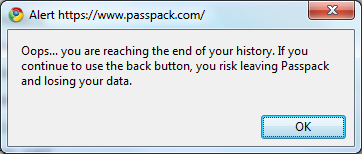
Passpack History Problem

The initial trigger for the message seems to be random. But after it initial message is seems to come back around every 3 minutes. So I did some digging. After poking around in the source I discovered that they’re using an older version of Tako Sano’s jQuery history plugin.

So I added some code to the historyCallback do some logging so I could get a better feel for what was going on.

4411
4412
4413
4414
4415
4416
4417
4418
4419
4420
4421
4422
4423
4424
4425
4426
4427
errorOccurred = lastErrorOccurred = new Date().getTime();
_back = function(h) {
    if (_backOk) {
        if (_backCallback) {
            _backCallback();
            _backCallback = null;
        }
        var hh = parseInt(h);
        var m = $.browser.netscape ? 2 : $.browser.msie ? 3 : 7;
        if (hh > m) {
            errorOccurred = new Date().getTime();
            console.log("hh: "+ hh +", m: "+ m +", delta: "+ (errorOccurred - lastErrorOccurred));
            lastErrorOccurred = errorOccurred;
            alert(PP.msg.man.bac);
        }
    }
};

After letting this run for a while I started to see a pattern. Here’s an excerpt of the results.

  • hh: 8, m: 7, delta: 209901 (~3.4 minutes)
  • hh: 8, m: 7, delta: 200888 (~3.3 minutes)
  • hh: 8, m: 7, delta: 190944 (~3.2 minutes)
  • hh: 8, m: 7, delta: 183514 (~3.0 minutes)
  • hh: 8, m: 7, delta: 197517 (~3.3 minutes)

For webkit (Chrome/Safari) based browsers the jQuery history plugin manually creates a stack to keep track of the history. So this is where I believe we are encountering the problem. If you look at line 4426 you can see that we create a history with a stack length of 9.

4412
4413
4414
4415
4416
4417
4418
4419
4420
4421
4422
4423
4424
4425
4426
4427
4428
4429
4430
4431
_back = function(h) {
    if (_backOk) {
        if (_backCallback) {
            _backCallback();
            _backCallback = null;
        }
        var hh = parseInt(h);
        var m = $.browser.netscape ? 2 : $.browser.msie ? 3 : 7;
        if (hh > m) alert(PP.msg.man.bac);
    }
};
runHistory = function() {
    $.historyInit(_back);
    z = $.browser.netscape ? 2 : $.browser.msie ? 4 : 8;

    for (var j = z; j >= 0; j--) $.historyLoad(j);
    _SetTimeout(function() {
        _backOk = 1
    },
    3000);
};

But on line 4419 we are working with a stack with a length of 8.

4419
        var m = $.browser.netscape ? 2 : $.browser.msie ? 3 : 7;

Shouldn’t this read as follows?

4419
        var m = $.browser.netscape ? 2 : $.browser.msie ? 4 : 8;

Bypass OpenDNS Blocked Sites At Work

Saturday, May 2nd, 2009

So your at work and you really want to watch that YouTube video your buddy sent you. But you can’t cuz YouTube is blocked. Well I’m here to show you how. This builds on a previous post I did about listening to Pandora in Canada. Your using the socks proxy we setup before but you still can’t watch YouTube clips because their being blocked at the DNS level. Nothing we can do about that right? Wrong. Lets configure Firefox to send DNS requests over the socks proxy. There by circumventing the DNS blocks at work.

Firefox - about:config

In Firefox type about:config into the address bar. Now type dns into the filter. Double-click on the network.proxy.socks_remote_dns to configure Firefox to send our DNS requests through the proxy. Voila! We can now laugh it up watching YouTube clips to our hearts content.

Check That Sketchy File With 39 Antivirus Apps

Saturday, February 7th, 2009

So you looking at this sketchy file you just downloaded and your a little nervious about running it because you don’t using any antivirus software. What do you do? Ususally just run the file and hope for the best. Well no more, welcome Virus Total. All you doing is upload the file to Virus Total. They scan it with 39 different antivirus engines and give you the results.

Virus Total

A great solution for scanning those small sketchy files that all of us end up downloading at some point to get our software to work they way we want it to.

Windows 7 Taskbar Progress Bar for Explorer

Sunday, January 4th, 2009

I’ve been playing around with Windows 7 for a while. Just recently I updated my install to the Windows 7 Beta 1 (Build 7000). When I was coping over my iTunes library I noticed something kind of cool going on in the taskbar. While the files were transfering in a mini progress bar was displayed behind the Explorer icon in the taskbar.

Windows 7 - Progress Bar in the Taskbar

It’s the little things like this that make Windows 7 really cool. I won’t talk about it too much right now but what makes Windows 7 worth while for me is the new Explorer interface. So much better than Vista’s Explorer interface.

Screenshots of Your Website in 50 Browsers

Friday, December 19th, 2008

Have you ever wondered what your website looked like in other browsers or even in other operating systems? Well the answer is here, browsershots.org. Browsershots is a free and open-source online service which generated screenshots of your website: in different browsers, on different platforms, and with different plugins. It’s a true amazing service. It’s a must for every web designer’s arsenal.

Accessing Pandora from Canada

Thursday, December 4th, 2008

If your like me you absolutely love the Pandora music service. However due to greedy music labels pushing their agenda in Washinton (see SaveNetRadio.org) Pandora was forced to limit its service to the US. What’s a geek to do? Why… use an ssh tunnel to proxy the Pandora service through a US server. How? You may ask. 

First we’ll setup the ssh tunnel. For that we’re going to use an application called Putty. To setup the ssh tunnel you’ll need to have access to a server based in the US with ssh enabled (for example – a Dreamhost account). For the purpose of the tutorial we’ll call the server “example.com”. After launching Putty you need to enter the hostname into the field provided. Now comes the magic. Expand the SSH category and select Tunnels. Under source port enter 8080, select the “Dynamic” and then click the Add button.

SSH Tunnel - Part 1

Click on the Open button. After click on Open you’ll be prompted for your username and password for, in the case of this example, example.com. After successful establishing your ssh connection all you have left to do is setup Firefox to use this ssh tunnel as a proxy.

Open up Firefox and select “Options” from the Tool menu then click on “Advanced”. Next click on the “Network” tab, then the “Settings” button. Select “Manual proxy configuration”. Now comes the important settings.  Erase the HTTP Proxy, SSL Proxy, FTP Proxy, and Gopher Proxy fields. Enter 127.0.0.1 under SOCKS Host and 8080 under Port.

SSH Tunnel - Part 2

Click OK and click OK once more. We’re done! Browse to www.pandora.com and crank the tunes.